


 Contact us
Earn 65 points in Bonus Bucks
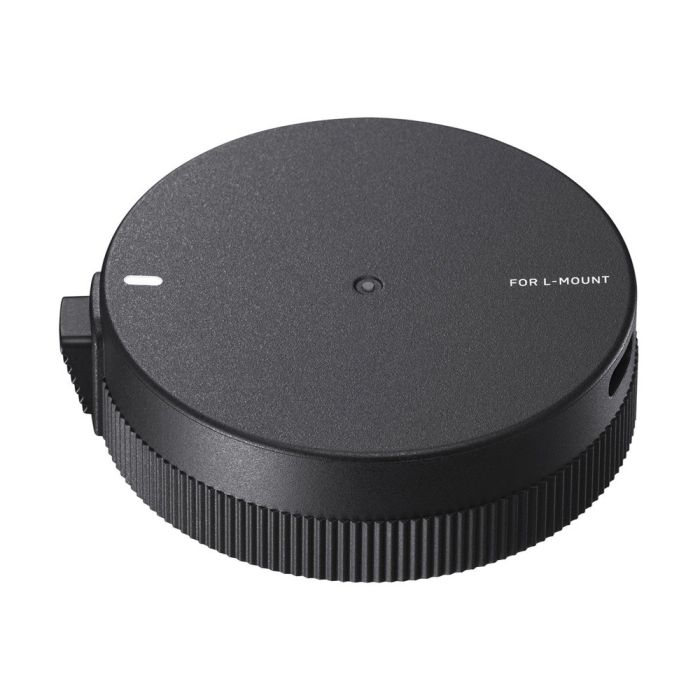
Sigma USB Dock UD-11 for L-Mount, Designed for Art, Contemporary & Sports Lenses
In stock
SKU
SIG878969
$65.00

Need help deciding?
Call with one of our experts.
Key Features
- Firmware Update: Update lens, converter, and teleconverter firmware for compatibility and fixes.
- Manual Focus Timing: Adjust focus ring rotation sensitivity to match shooting style.
- USB-C Interface: Modern reversible connector with included SUC-31 cable for PC connection.
- Wide Lens Support: Works with SIGMA Art, Contemporary, and Sports lenses for multiple mounts.
- Accessory Firmware Support: Update MC-21 mount converter and TC-1411/TC-2011 teleconverters.
- Integration with Optimization Pro: Manage firmware, lens profiles, and backup settings via SIGMA software.

Free local pickup
Free standard shipping
Need it now? Select Free Local Pickup at checkout and collect your order the same day during business hours. Head to 1168 Wantagh Ave, Wantagh, NY 11793 - you’ll get our online discounts, friendly guidance, and zero shipping delays.
Sigma USB Dock UD-11 for L-Mount, Designed for Art, Contemporary & Sports Lenses Overview
Description
The SIGMA USB DOCK UD-11 for L-Mount is a compact, first-party accessory for firmware updates and lens customization, using SIGMA Optimization Pro and a USB-C interface. It supports compatible SIGMA Art, Contemporary, and Sports lenses, plus MC-21 mount converter and TC-1411/TC-2011 teleconverters.
Plug a compatible lens into the UD-11, connect the dock to your computer with the included SUC-31 cable, then run SIGMA Optimization Pro to update firmware, tune focus ring response, and save lens settings locally for pro workflows and rental inventory management.
Problem
Lens firmware and behavior can cause compatibility issues, unpredictable manual-focus response, and inconsistent performance across bodies and accessories. Photographers need a safe, local, manufacturer-supported way to update firmware and tune lens behavior without shipping gear for service.
- Worried about lens-to-camera compatibility after body firmware updates
- Need local firmware fixes without sending lenses away
- Require consistent MF feel across lenses for video or studio work
Solution
Use the SIGMA USB DOCK UD-11 and SIGMA Optimization Pro to update firmware, tune manual-focus timing, and configure lens profiles locally, ensuring lenses work reliably with new bodies and across professional workflows.
Benefits
- Immediate Compatibility: Apply firmware updates at your desk to avoid incompatibility with new camera bodies.
- Customized MF Feel: Tailor focus ring timing for precise manual-focus pulls.
- Accessory Coverage: Update MC-21 and TC teleconverters for extended system support.
- Fleet Management: Standardize firmware across rental or studio gear quickly.
Applications
- Home and studio firmware maintenance for Sigma lens owners
- Videographers tuning manual-focus behavior for follow-focus systems
- Rental houses and resellers standardizing lens firmware and settings
Why Choose
- First-party Sigma support for firmware, ensuring correct updates and compatibility
Specifications
| Model / Variant | USB DOCK UD-11, L-Mount |
| Product Type | Accessory, Lens USB Dock |
| Category / Sub-Category | Camera accessory, Lens USB Dock |
| Connectivity & I/O | USB Type-C (dock), SUC-31 cable included (USB-A to USB-C) |
| Performance / Capacity | Firmware updates, MF timing adjustment, lens profile management via software |
| Mount / Interface | L-Mount (this SKU), variant exists for Canon EF-M |
| Warranty | Limited Warranty, manufacturer-listed terms |
| Brand | SIGMA |
| Manufacturer SKU | 878969 |
| UPC | 085126878696 |
What’s included
- 1- USB Dock UD-11 for L-Mount
- 1- SUC-31 USB Cable (USB Type-A to Type-C)
Compatibility
| SIGMA MC-21 | SIGMA TC-1411 | SIGMA TC-2011 | SIGMA Art Series L-Mount | SIGMA Contemporary Series L-Mount |
| SIGMA Sports Series L-Mount | Selected EF-M lenses | SIGMA Optimization Pro | SUC-31 Cable | Mount-specific UD-11 variants |
FAQ
Which lenses are compatible with the UD-11?
Compatible with SIGMA Art, Contemporary, and Sports lenses for the dock's supported mount, and selected lenses listed in Sigma's compatibility documentation.
Do I need SIGMA Optimization Pro to use the UD-11?
Yes, SIGMA Optimization Pro is required to perform firmware updates and customizations; it is available for Windows and macOS.
Can the UD-11 update teleconverters and mount converters?
Yes, the UD-11 supports firmware updates for MC-21 mount converter and TC-1411, TC-2011 teleconverters when listed in Sigma's compatibility list.
What cable is included with the UD-11?
The SUC-31 USB cable (USB-A to USB-C) is included for connection to a computer.
Is there a difference between mount versions?
Yes, UD-11 is produced in mount-specific SKUs, such as the L-Mount version (UPC 085126878696, SKU 878969) and an EF-M variant.
Can I revert settings changed via Optimization Pro?
Settings changes are managed through SIGMA Optimization Pro, which allows configuration and, where supported, resetting to default profiles.
What operating systems are supported?
SIGMA Optimization Pro supports Windows (8.1, 10, 11) and modern macOS versions; check Sigma's software page for the latest requirements.
Will the UD-11 update lens firmware via the camera?
Some lenses allow firmware updates via compatible camera bodies; UD-11 is primarily for computer-based updates via Optimization Pro.
Does the UD-11 require power or battery?
No battery is required, the dock is powered via the USB connection to your computer through the included cable.
What warranty does the UD-11 include?
Manufacturer warranty details are included in the package; retailers commonly list a limited warranty period, consult Sigma or your reseller for exact terms.
Similar products



Same day shipping
Order by 3:00 PM EST, and we’ll have most items on their way to you that same business day.

Free two-day shipping
Get it fast with our complimentary Two-Day Shipping, absolutely no hidden fees. Orders ship Monday–Friday, excluding weekends and holidays.