



 Contact us
Earn 279 points in Bonus Bucks
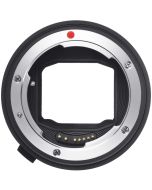
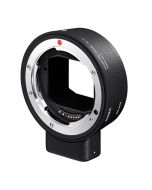
Sigma Mount Converter MC-11, Canon EF-E to EF Mount, Increases Lens Compatibility
In stock
SKU
SIG89E965
$279.00

Need help deciding?
Call with one of our experts.
Key Features
- Cross-Mount Compatibility: Use Sigma SA and Canon EF lenses on Sony E bodies.
- Autofocus Support: Maintains fast-hybrid or contrast AF depending on the camera.
- Stabilization Passthrough: Supports lens OS plus in-body stabilization when present.
- EXIF Metadata: Embeds lens type, focal length, and aperture into image EXIF.
- Flocked Interior: Felt-lined interior reduces internal reflections and flare.
- LED Compatibility Indicator: Built-in LED shows compatibility or firmware needs.

Free local pickup
Free standard shipping
Need it now? Select Free Local Pickup at checkout and collect your order the same day during business hours. Head to 1168 Wantagh Ave, Wantagh, NY 11793 - you’ll get our online discounts, friendly guidance, and zero shipping delays.
Sigma Mount Converter MC-11, Canon EF-E to EF Mount, Increases Lens Compatibility Overview
Description
The Sigma Mount Converter MC-11 lets photographers use Sigma SA and Canon EF lenses on Sony E-mount mirrorless bodies while preserving autofocus, stabilization, and EXIF metadata where supported. Its metal construction and flocked interior reduce internal reflections for reliable image performance across compatible lens and body pairings.
The Sigma Mount Converter MC-11 is a smart mount converter that electrically translates lens communications from Sigma SA and Canon EF lenses to Sony E-mount mirrorless cameras. Designed for shooters migrating systems or wanting greater lens flexibility, the MC-11 preserves AF performance, optical stabilization, and critical EXIF data for supported lens and camera combinations.
Problem
Photographers who own Canon EF or Sigma SA lenses face limited native options on Sony E systems and risk losing autofocus, stabilization, or metadata when using generic adapters. They need a firmware-updatable, manufacturer-backed adapter that provides reliable, near-native functionality.
- Compatibility uncertainty across lens and body combinations.
- Potential AF performance loss when using adapters.
- Difficulty maintaining firmware alignment between lens, adapter, and camera.
Solution
The MC-11 solves cross-platform limitations by providing an official Sigma adapter with an electrical interface, firmware updates, and a diagnostic LED. When updated and paired with supported lenses and Sony Fast-Hybrid AF bodies, it delivers autofocus, stabilization passthrough, and EXIF embedding with minimal compromise.
Benefits
- Flexibility: Reuse existing EF and SA lenses on Sony bodies to save cost.
- Near-Native Functionality: Preserves AF, OSS, and EXIF for supported pairings.
- Future Proof: Firmware updates expand compatibility with new lenses.
- Asset Value: Broadens resale and practical value of existing lens investments.
Applications
- Hybrid shooters migrating to Sony who want to continue using Canon EF or Sigma SA glass.
- Event and wedding photographers needing autofocus and stabilization on Sony mirrorless bodies.
- Videographers using EF lenses on Sony E bodies while retaining lens characteristics and stabilization.
Why Choose
- Official Sigma product with manufacturer-backed firmware updates, offering trust and ongoing compatibility improvements.
Specifications
| Model / Variant | Mount Converter MC-11 |
| Product Type | Lens mount adapter |
| Category / Sub-Category | Camera accessories, Lens mount adapter |
| Mount / Interface | Supported lens mounts: Sigma SA, Canon EF; Camera mount: Sony E |
| Materials / Finish | Metallic build, flocked interior to minimize reflections |
| Performance / Capacity | Autofocus passthrough, stabilization support, EXIF metadata embedding |
| Firmware Upgradable | Yes, via Sigma Optimization Pro and USB Dock |
| Connectivity & I/O | Electrical contacts for lens to camera communication |
| Warranty | Manufacturer warranty, region dependent |
| Brand | Sigma |
| Manufacturer SKU | 89E965 |
| UPC | 85126932503 |
What’s included
- 1- Mount Converter MC-11, Canon EF-E to EF-Mount
- 1- Front and Rear Caps
- 1- USB Cable
Compatibility
| Sony alpha 7 series | Sony alpha 9 series | Sony alpha 7S series | Panasonic S series | Sigma fp series |
FAQ
Which lenses are supported by the MC-11?
Supported lenses include many Sigma SA-mount and Canon EF lenses. Compatibility depends on specific lens and camera body combinations and firmware level, consult Sigma's compatibility notes for details.
How do I update the MC-11 firmware?
Update firmware using Sigma Optimization Pro on a PC along with the appropriate USB Dock or firmware update tool, following Sigma's published update instructions.
Will autofocus performance be the same as a native lens?
On compatible Fast-Hybrid AF Sony bodies and supported lenses, autofocus is near-native. Performance can vary by lens and camera, with some combinations showing slight differences in speed or behavior.
Does the MC-11 preserve optical stabilization?
Yes, the adapter supports lens OS and in-body stabilization coordination when the lens and camera both provide those features.
Will EXIF data from the lens be embedded in my images?
Yes, the MC-11 embeds lens information, focal length, and aperture into image EXIF metadata for supported lenses.
What does the LED indicator mean?
The built-in LED indicates whether the attached lens is compatible, or if a firmware update is required for full functionality; consult Sigma's LED guidance for specific patterns.
Can I use Canon EF lenses that require unique drive protocols?
Many Canon EF lenses work, but some models with specialized drive mechanisms or very old designs may have limited support; check Sigma's compatibility list for specifics.
Are there known AF edge cases I should expect?
Certain lens and body combinations may show focus hunting, reduced Eye-AF support, or slower tracking. These are edge cases tied to differences in AF systems and are often improved by firmware updates.
Do I need to update lens firmware too?
Keeping both lens and adapter firmware up to date is recommended. In some workflows, updating the adapter before lens firmware helps ensure compatibility.
What should I carry with me for vendor support or troubleshooting?
Carry the adapter, lens, camera body, and any USB Dock or firmware tool. Cleaning contacts and re-seating the lens often resolves intermittent communication problems.
Similar products

Same day shipping
Order by 3:00 PM EST, and we’ll have most items on their way to you that same business day.

Free two-day shipping
Get it fast with our complimentary Two-Day Shipping, absolutely no hidden fees. Orders ship Monday–Friday, excluding weekends and holidays.